 Overview
CacheMe is a geocaching application for the N9. It uses the database of www.geocaching.com and shows the geocaches on OSM (OpenStretMaps), Cloudmade and Nokia maps. Beside the normal maps it also can show satellite images. You can load the cache descriptions, logs and waypoints.
It is a port of the great CacheMe application © 2011-2012 by Till Harbaum. For more information about the original CacheMe, please have a look at www.harbaum.org/till/cacheme/
One of the features is support of the Groundspeaks GcLive API. This allows Groundpeak premium members quickly to access unlimitted geocaches data. Also you can load GPX files for offline usage.
Non premium users will only be able to fetch the data of 3 (traditional) geocaches per day. This is a limitation given by Groundspeak and not of CacheMe itself!
CacheMe now also supports offline maps. With a tool like MOBAC you can fetch maps from OSM or another free map service and store them for offline usage in CacheMe. Simply save them in the Big Planet Tracks SQLite format and save them somewhere on the phone. Then open the settings in CacheMe and select offline maps and the stored file.
Screenshots

CacheMe for N9 with Nokia Satellite maps
|

CacheMe for N9 with OpenStreetMaps and visible menu bar
|
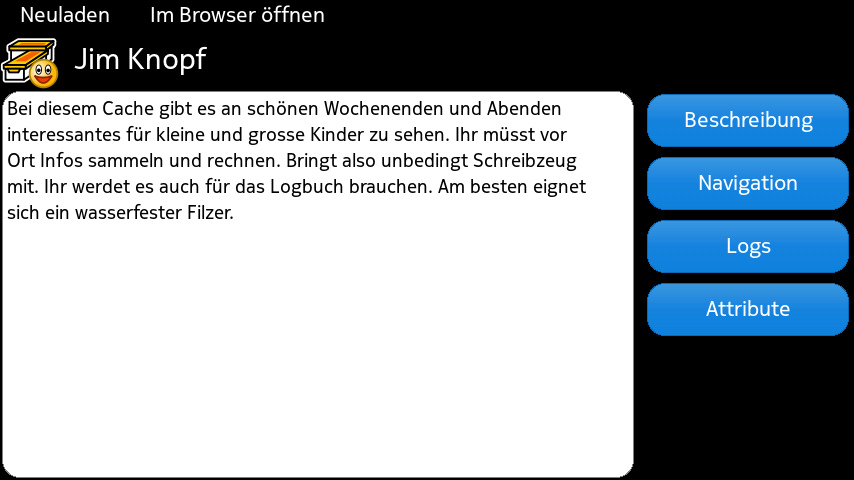
CacheMe for N9 showing a geocache description
|

CacheMe for N9 showing the log of a geocache
|
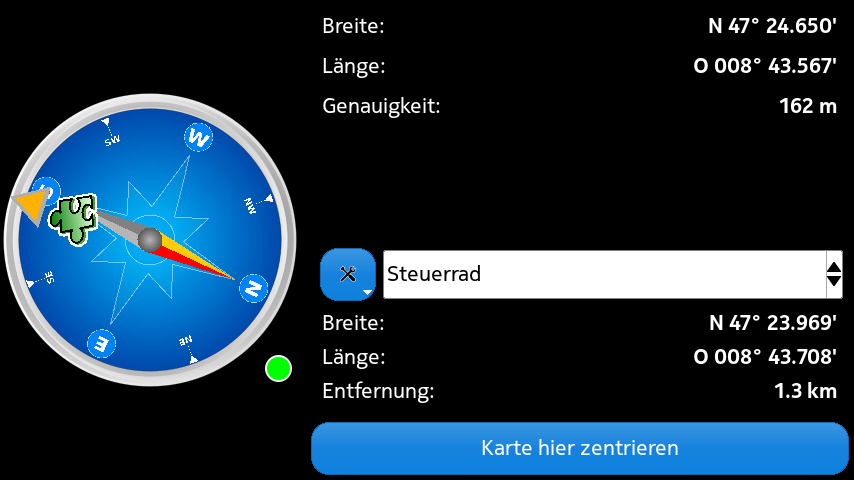
CacheMe for N9 showing the compas and waypoint information of a geocache
|
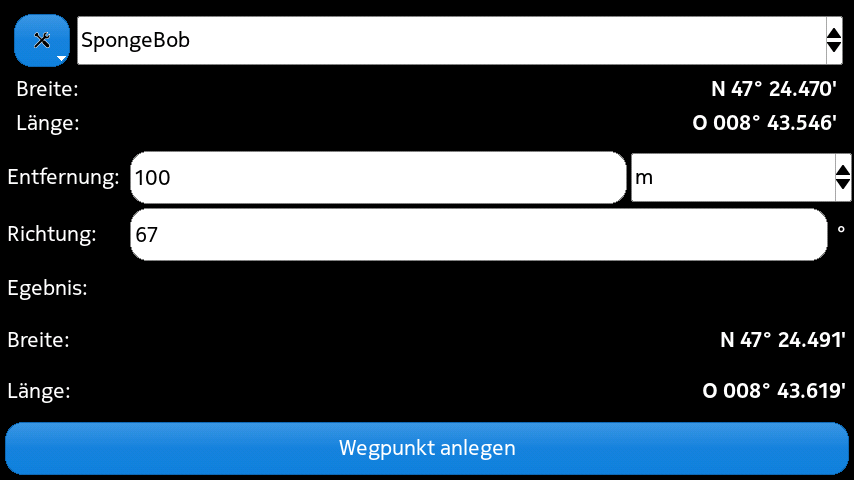
Quickly add a new waypoint if you know the coordinates or distance and direction
|
Download
Current version
Get it from here: [wpfilebase tag=file path=’software/harmattan/cacheme_0.8.16-1-Harmattan10_armel.deb‘ /]
Since it is a lot of work to keep it working and to full-fill all requirements of the Nokia Guidelines, I decided to not provide it for free anymore. If you buy the app, you encourage me to continue the work on it!
Before you buy it, please try out the trial version!
Trial version: store.ovi.com/content/219788
Full version: store.ovi.com/content/304221
Since the new 0.9.x version uses an access key, I am not able to provide the source any more. If you are interested in the source, please get in contact with Till Harbaum: www.harbaum.org/till/cacheme/
Old (not supported version)
There is an old version available which does not work any more with the online maps of groundspeak. How ever you still can use it if you have pocket queries (GPX-Files):
[wpfilebase tag=file path=’software/harmattan/cacheme_0.8.16-1-Harmattan2_armel.deb‘ /]
The source code of the old 0.8.16 version is available as well:
[wpfilebase tag=file path=’software/harmattan/cacheme_0.8.16-1-Harmattan2.tar.gz‘ /]
Help
Please have a look at the official help for Till Harbaums version: www.harbaum.org/till/cacheme/help.html. The documentation there also fits your N9 version.
For additional information, please have a look at the FAQ below.
FAQ
- Q: What is the difference between CacheMe for the N9 and the official CacheMe from Till Harbaum?
A: CacheMe is the official application developed and maintained by Till Harbaum. How ever he does not support the Nokia N9. I took his CacheMe version and made it run on Harmattan, the operating system of Nokias N9 smart phone. It’s basically still CacheMe with a modified GUI. I added some features which I missed in the official version. - Why is it not free anymore?
It is a lot of work to keep it working and to full-fill all requirements of the Nokia Store guidelines. So I decided to make a non free version. If you buy the app, you encourage me to continue the work on it! To try it out, there is also a trial version. It has the same functionality but terminates after 10 minutes. - Q: Can I use it offline?
A: It does not fully support offline usage. This is on one side due restrictions from Groundspeak, the owner of www.geocaching.com on the other hand due technical limitations. If you are a Groundspeak premium member, you can generate GPX files. Those can be used with CacheMe while you are offline. Also, there is now support for offline maps (see above). - Q: I downloaded the complete Nokia maps for my country in the maps applications. Why does CacheMe note use thes?
A: Nokia does not provide an API for usage with 3th-party applications. - Q: How can I help?
A: I am always happy about a feedback. Add a comment below or send me an email. - Q: It always brings an error message about too many geocaches
A: CacheMe will get overloaded and will hang, if it has to process too many geocaches at once. To avoid that, it limits the number of geocaches to be shown. If you get this message or if it hangs, please zoom closer and use the option to hide own/found geocaches. - Q: I need help
A: Send me an email or use the forum at http://talk.maemo.org/showthread.php?t=79177
More
There is also a general FAQ at Tills Harbaums website: www.harbaum.org/till/cacheme
Hi,
I was so satisfied with this app, but I bought a new phone iPhone 6s and I can not upload this app again. Do you know why? I really like this app, because I can log TB as well as caches. And I’m just now as without hand. Some advice why is it happens?
CacheMe got written for the Nokia N9, which is based on Linux.
Apple devices are not supported!
OAuth failure when trying to use gclive 🙁 Update would be nice since it was a paid app.
As you might be aware off, I only did some modifications on the official CacheMe and made it work & look OK on the N9 (which was a very time consuming task).
As long as Till is not providing a fix for this issue, I will not be able to provide a fix for the N9. Like me, Till is also disappointed of the discontinuance of Nokias Symbian and Harmattan devices. So please do not expect an update in the near future!
I am sorry about that but you have to understand that the N9 platform is dead and there is no reason for a developer to invest further time into it.
I myself moved away from the N9/950 as it has no future and some critical features are missing.
Can someone please advise why this app might be useful? I’m considering getting it but I’m not 100% sure if it’d be used much, I need several real world examples of where/how it may be handy!
So why don’t you simply try it out yourself?
There is a trial version available for this.
It seems you didn’t really read the page before commenting it…
mz_i_norge hat einen Bericht über CacheMe geschrieben:
http://opensmartpad.org/meego/apps/sonstige/item/4211-cacheme4harmattan-das-schweizer-cacher-taschenmesser-f%C3%BCrs-n9.html
Vielen Dank!
Hi, just bought the cacheme app. Does not work. I do not get all icons, to star with. I miss the reload icon and also the satelite icon. Can only zoom in and out of the map, which is my home location, and i can get access to the menu.
Hi Roy
Thank you for your feedback.
I would like to help to solve the issues, but I need some more information first.
Did you have an older version of CacheMe installed before did they work?
Did you first try the trial version? Did it work?
The GPS icon will only show up once a valid GPS position is available. This can take some time, especially if you are inside.
The Reload icon is only available if you have selected GcLive as Cache source.
To use GcLive you will have to authorise Cacheme to use Groundspeaks database. Did you successfully authorise it? (menu Tools > Authorise).
Please clarify so I can help you.
Hi George,
and thank you for your fast reply.
Your are right, being a bit patient was sufficient getting the GPS icon. And, all my remaining problems were resolved by first selecting GcLive for the Cache source, and thereafter Authorise (under Tools) the use of the database.
Thanks a lot.
-Roy
Trial or full version is not jet in Nokia Store.
Please be patient. Nokia store is very slow in updating their servers!
I tried newest version, but application didn’t show unknown caches, is there some setting for that? I tried with GPX file and Gc-live.
What do you exactly mean with unknown caches? Does it show other cache types?
0.9.2003 is great. Thanks.
Link is dead? Where can I please download cacheme_0.9.2-Harmattan1_PRELIMINARY_armel.deb?
It is fixed now. Please also check again in some weeks, I soon will release a new nicer version.
Thanks for great update!
What is the status about CacheMe4Harmattan and new geocache.com API bugfix? Do you have twitter account where can I and other users follow to new issues?
I am working on a new version, but will need some more time.
To get notifications, please check this page or the forum at http://talk.maemo.org/showthread.php?t=79177
Thank you, George for this great software! I’m currently using your soft with PocketQueries and it’s almoust I need. I’m using it in offline mode, so I can’t read logs, so maybe in future you can add feature to pre-load somehow user logs for specific geocaches(not for all geocache). But I understand, that it feature only can be done after you’ll implement new API from geocaching.com…
Hello again. 🙂
I have used your software for a while and it has almost all I need. Cache logs I couldn’t read because of wrong GPX files. Now last feature I need is offline maps… I saw one software for Android that loads map in multiple zooms for offline use. How do you think, how much work you need to invest for this feature?